Many people like to use an Apple Watch while running or walking. It helps keep track of steps, heart rate, and time. But what about when you run on a treadmill? Can the Apple Watch track distance on a treadmill? This question is common for many users.
How Does Apple Watch Track Distance?
The Apple Watch mainly tracks distance in two ways:
- Using GPS when you run outside
- Using the built-in motion sensors when you run indoors
When you run outside, the watch uses GPS to find where you are. It measures how far you have traveled by following your route. This method is very accurate.
But on a treadmill, you stay in one place. So, GPS cannot work. The watch has to guess the distance using other ways.
Using Motion Sensors on Treadmill
When you run on a treadmill, the Apple Watch uses its motion sensors. These sensors detect your arm and body movement. It counts your steps and estimates distance.
The watch uses your step count and stride length to guess distance. Stride length is how long each step is. The watch tries to learn your stride length over time.
This method works, but it is not perfect. It gives an estimate, not an exact distance. Sometimes, it may show more or less distance than you really ran.
How to Improve Distance Tracking on Treadmill
You can make distance tracking better on your Apple Watch. Here are some tips:
- Calibrate your Apple Watch: Calibration helps the watch learn your stride length. You can do this by walking or running outside with GPS on for about 20 minutes.
- Use the Workout app: Always start a treadmill workout in the Workout app. Choose “Indoor Run” or “Indoor Walk” to get better results.
- Keep your watch snug: A tight fit helps the sensors work well.
- Update your personal info: Add your height and weight in the Health app. This helps the watch estimate stride length better.
Calibrating Your Apple Watch Step by Step
Calibration helps the watch learn your steps and pace well.
- Go outside to a flat, open area.
- Make sure Location Services are on. Go to Settings > Privacy > Location Services.
- Open the Workout app on your Apple Watch.
- Select “Outdoor Walk” or “Outdoor Run.”
- Walk or run at your normal pace for 20 minutes.
- The watch will use GPS and motion sensors to learn your stride.
After this, your Apple Watch will give better distance estimates indoors.

Credit: www.liftingitalia.com
Limitations of Apple Watch on Treadmill
Even with calibration, some limits remain:
- The watch depends on arm movement to count steps.
- If you hold the treadmill handles, arm movement is less.
- This can cause the watch to miss steps and show less distance.
- Some people have uneven stride lengths.
- The watch may not know the exact speed of the treadmill belt.
So, the distance shown is only an estimate. It is not as exact as using treadmill data or GPS outside.
Using Treadmill Data with Apple Watch
Some modern treadmills have Bluetooth or other ways to connect with devices. They can send speed and distance data.
Unfortunately, Apple Watch does not directly connect with most treadmill machines yet.
But you can still do this:
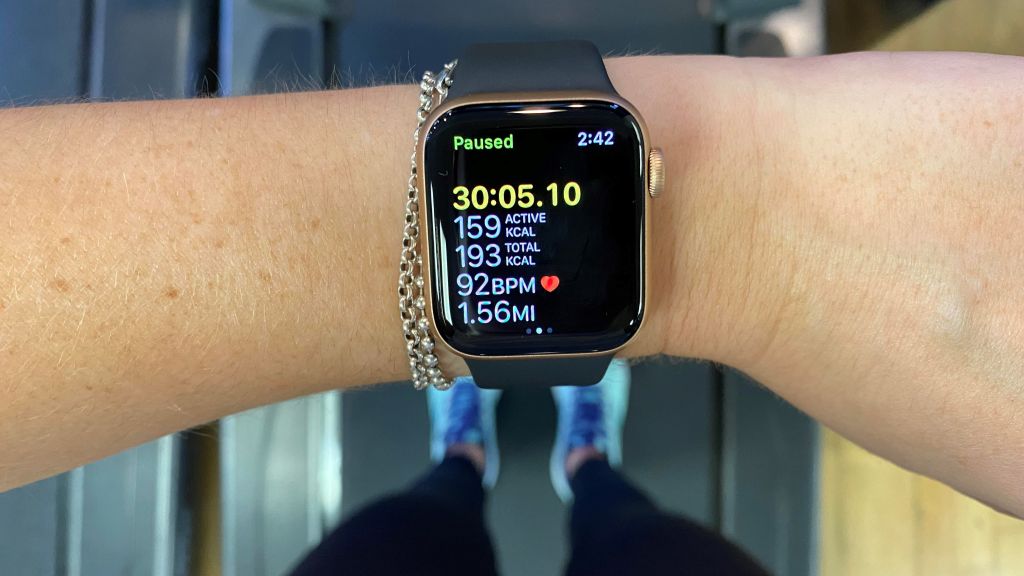
- After your treadmill workout, enter the distance manually in the Health app or Workout app.
- This helps keep your health data accurate.
Credit: www.liftingitalia.com
Third-Party Apps for Better Tracking
There are apps you can use with Apple Watch for treadmill runs.
Some apps let you enter treadmill speed and time. They calculate distance for you.
Others use the watch sensors but may offer better accuracy than the default app.
Examples include:
- Runkeeper
- Zombies, Run!
- Strava
Try these apps if you want more options and control.
Summary: Can Apple Watch Track Distance on Treadmill?
Yes, Apple Watch can track distance on a treadmill. But it uses motion sensors, not GPS.
This means distance is an estimate. Accuracy depends on your arm movement and calibration.
Calibrate your watch by running outside with GPS. Use the Workout app for treadmill sessions.
If you hold the treadmill handles, the watch may miss some steps.
You can also manually enter treadmill distance for better records.
Third-party apps may help with tracking too.
Table: Pros and Cons of Apple Watch Treadmill Tracking
| Pros | Cons |
|---|---|
| Tracks distance without extra devices | Distance is only an estimate |
| Easy to start treadmill workouts in Workout app | Less accurate if arm movement is limited |
| Can be calibrated for better results | Does not connect directly to treadmill machines |
| Monitors heart rate and calories too | Stride length varies for each person |
Final Thoughts
The Apple Watch is helpful for treadmill workouts. It gives you a good idea of how far you run.
Remember, it is not perfect. Use calibration and good habits to improve tracking.
If you want exact treadmill distance, use the treadmill’s display or enter data manually.
Overall, Apple Watch is a useful tool for indoor running.
Frequently Asked Questions
Can Apple Watch Track Treadmill Distance Accurately?
Apple Watch estimates treadmill distance using motion sensors. It may not be 100% accurate but offers good approximations. Calibration improves distance tracking over time.
How Does Apple Watch Measure Treadmill Workouts?
The watch uses its accelerometer and heart rate sensor to estimate distance and calories. It tracks your arm movement and pace during treadmill running.
Does Apple Watch Need Treadmill Data Input?
No manual input is required. The watch automatically records treadmill workouts and estimates distance based on your movements.
Can Apple Watch Sync Treadmill Workouts With Iphone?
Yes, treadmill workout data syncs automatically to the iPhone Health app. This helps you track progress over time.